FormFillPilot bookmark
Fill web forms from your files without installing anything: one button in your bookmarks bar. Useful on a work computer where you cannot install anything, or to try FormFillPilot in a minute. Tested in Chrome and Edge.
1. Drag this button to your bookmarks bar
No bookmarks bar? Press Ctrl+Shift+B (Cmd+Shift+B on a Mac) to show it, then drag the button onto it.
2. Use it on any page with a form
- Open the page with the form and click the FormFillPilot bookmark. Two things open: the FormFillPilot panel on the right of the page (it shows what is being filled) and a small box at the bottom left (ours - your key goes there). In the web version the panel's own fill buttons are dimmed: you fill from the small box.
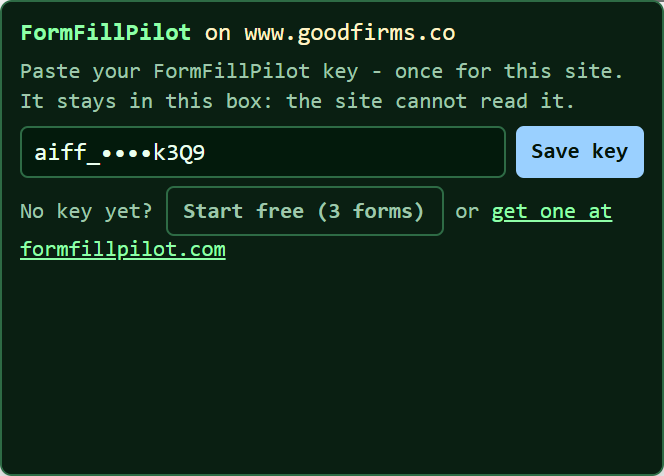 The first time on that site, paste your FormFillPilot key into the small box. The key stays inside the box: the site cannot read it. On another site you paste it once more.
- Press AUTOFILL / REFILL in the small box. The answers come from your files; check the form and submit it yourself - FormFillPilot never submits.
Your files. Add your CV, company sheet or notes on the PDF page - never through another site's page. The bookmark uses the same key, so it fills from the same profile.
Forms that reload the page between steps. When a form loads a whole new page for its next step, click the bookmark again on each new page - the box opens with your key already there and fills that page. (Forms that change steps in place - most job and marketplace forms - are filled step by step with "all pages".)
Where it does not open. Some sites block outside scripts with their security settings (GitHub does, for example). The bookmark then says so plainly; on that site, type the form yourself.
Try it now
Open our test form microcitylabs.com/testforms and click the bookmark. No key yet? See the plans.
Make the bookmark by hand
Create a new bookmark, name it FormFillPilot, and paste this as its address: